Card States
Virtual cards are activated and ready to use by default. When the card is either expired or canceled by the user it will transition to the cancelled state. Physical cards are initially in the "created" state which changes to "shipped" when the card order is sent to a manufacturer. Both "created" and "shipped" cards cannot be used for transactions. After card enters "shipped" state, it can be activated.
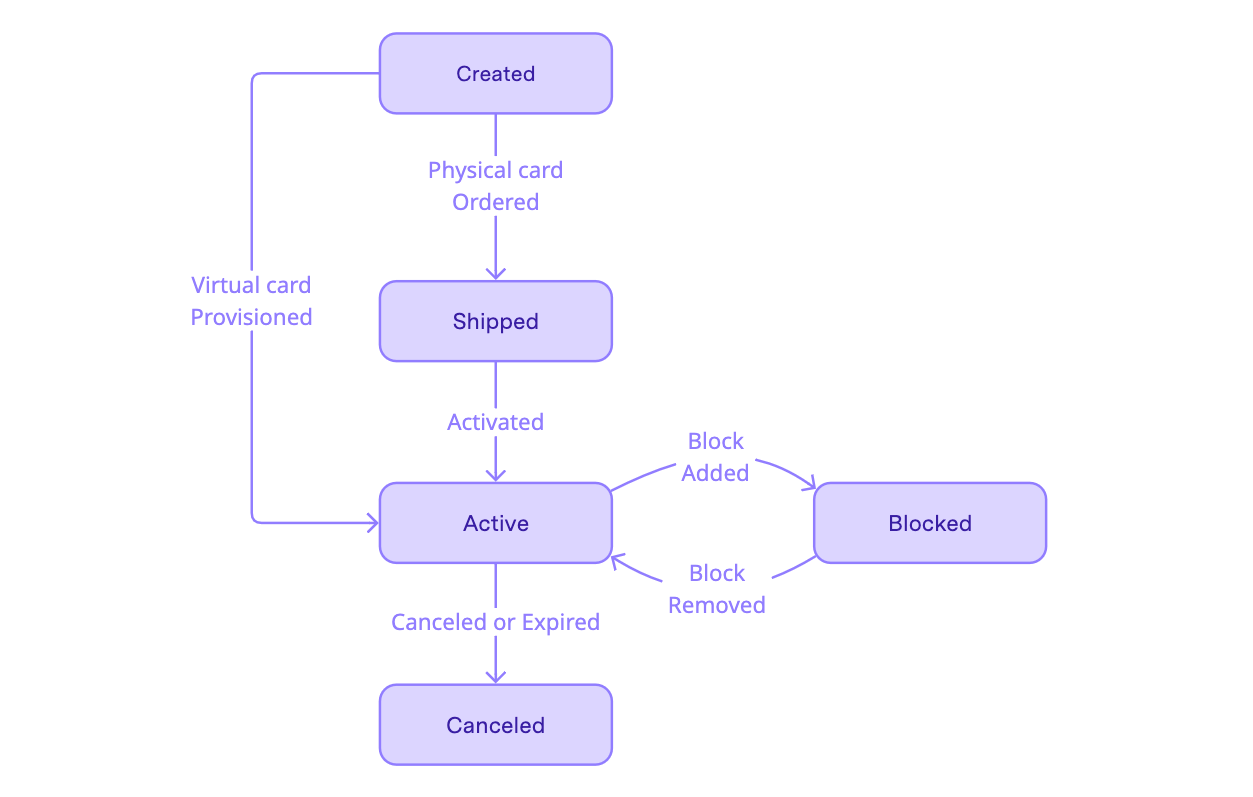
State Transitions
Create a Card
Call the Create Card operation to request Immersve generate a card, returning an ID. A virtual card is ready to use when a call to Get Card with the card ID returns a payload with status "active". A physical card is initially in the "created" state which changes to "shipped" when the card order is sent to a manufacturer. Once the card is in the "shipped" state, it can be activated.
Activate a Card
Physical cards must be activated before they can be used to perform transactions. To activate a card, call the Activate Card endpoint. Once the card is activated, it will transition to an active state and can be used for transactions.
Block a Card
Calling the Freeze Card endpoint will temporarily block a card. While a card is blocked it cannot be used to perform transactions.
Unblock a Card
To remove a block the Unfreeze Card endpoint is called. This returns the card to an active status allowing it to once again be used to perform transactions.
Cancel a Card
If the card is lost or stolen, cancel the card by calling the Cancel Card endpoint. The card will transition to the cancelled state and cannot be used for transactions.
Reissuance
Reissuance creates a new successor card linked to the original. Integrators are encouraged to reissue cards when a card is approaching expiry, to ensure continuity of service for the cardholder.
The successor card has the same PAN but with a new expiry date and new security code (CVC).
- Continuity of recurring payments. Participating merchants automatically receive the new card details when the card is reissued.
- xPay wallet continuity. Cards loaded into xPay wallets are automatically updated to the new card details.
Reissued cards themselves are reissuable. Reissuance creates a chain of cards linked by a seriesId. However, once an individual card in the chain is reissued, it cannot be reissued again.
Subscribe to webhooks
An Card Expiry Upcoming webhook is sent when a card is approaching its expiry date. Integrators are encouraged to communicate with the cardholder the upcoming card expiry and to update their payment details with merchants who do not participate in automatic billing updates.
Call the reissue-card endpoint
Call the Reissue Card endpoint. The successor card will share a seriesId with the predecessor card. Integrators may wish to prompt the cardholder for an updated shipping address before reissuing physical cards. Shipping address is not carried over from the predecessor card.
Activate the successor card
Virtual cards are activated automatically. Physical cards are shipped to the cardholder and require activation. See the Issue a Physical Card guide on how to activate a physical card.
Once the successor card is activated, a Card Reissue Succeeded webhook is sent and the predecessor card is cancelled. If reissuance fails, a Card Reissue Failed webhook is sent and the predecessor card remains active until it is expired or canceled. If reissuance fails, attempt to reissue the card again.
Webhooks
Each card state transition is associated with a webhook topic:
Card Created Card Shipped Card Tracking Updated Card Activated Card Block Created Card Block Released Card Canceled Card Expiry Upcoming Card Reissue Succeeded Card Reissue Failed
See the Configuring Webhook Listeners guide for more information on how to subscribe to webhooks and receive notifications of card state changes.