A physical card is a payment card that is manufactured and shipped to the cardholder. Once activated and funded, it can be used for in-store purchases, ATM withdrawals and other card-present transactions, as well as online purchases.
See the Issue a Virtual Card guide for instructions on how to issue a virtual card available for online purchases and other card-not-present transactions.
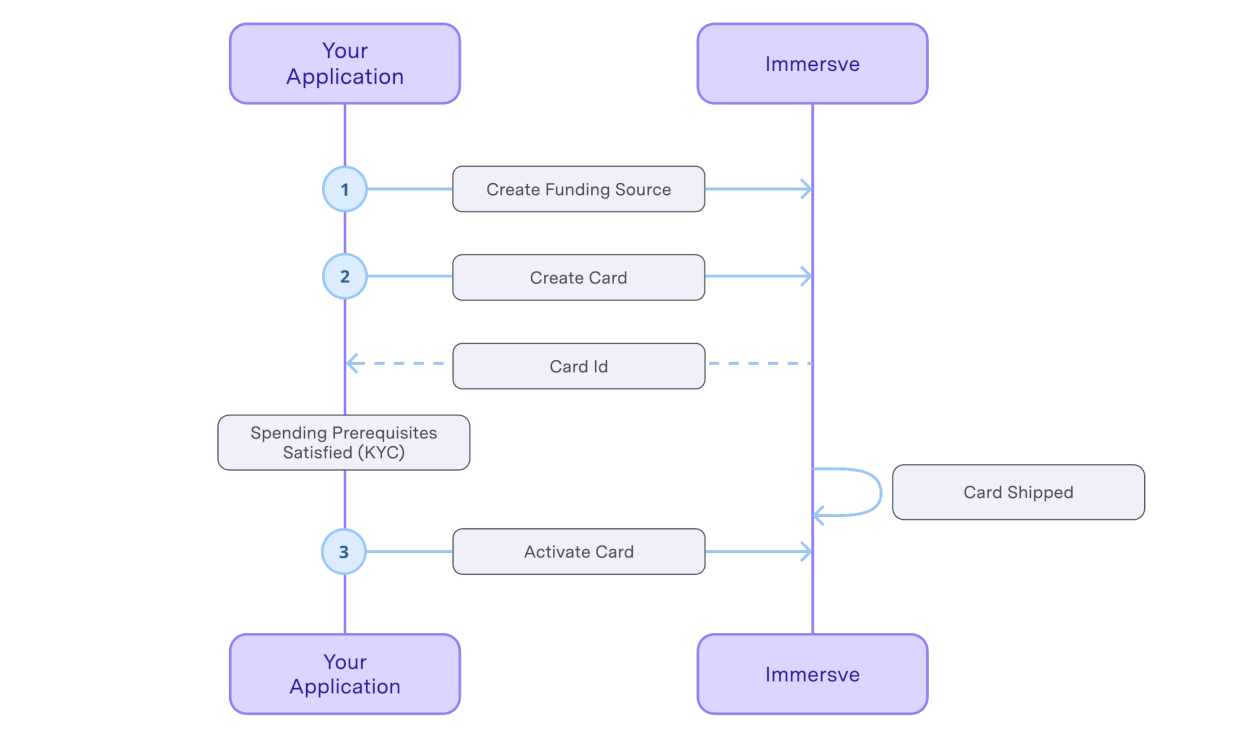
Before being permitted to create a card a user must first have successfully fulfilled any regulatory prerequisites as instructed by the Get Spending Prerequisites endpoint.
Authentication
The authentication processes are described in the Authentication guide. As the user account is anchored by control of the private key, there is no distinct prior explicit registration or signup process needed before authenticating.
Provision Funding Source
A Funding Source is required for card creation. Besides this requirement, cards and Funding Sources are managed independently. See Create Funding Source and the Card Funding guide.
Create a Card
Call the Create Card endpoint to request a physical card. The specified card program must support physical cards. The request body must include shippingAddress, shippingMethod and language so that the card can be delivered to the cardholder once manufactured. The language field determines the language used for the card carrier (the physical packaging to which the card is attached for delivery).
Physical cards are not activated upon creation. The card will initially have a status of "created" which will eventually change to "shipped" once the physical card order has been picked up by a manufacturer. After the card status changes to "shipped", it can be activated. See the Card Lifecycle guide for more information on the card lifecycle and the various card statuses.
Use Card Shipped webhook to be notified when the card is shipped. Alternatively, poll the Get Card endpoint to confirm the card status. The expiresAt field returns the exact card expiry timestamp. The expiry field returns the expiry date printed on the card.
Tracking the Card
Once a physical card ships, a tracking URL may become available. Use the Card Tracking Updated webhook to be notified when tracking information becomes available or changes. Alternatively, read the trackingUrl field on the response from the Get Card endpoint, which is populated once a tracking URL is available.
Activate the Card
Once the cardholder has received their physical card, call the Activate Card endpoint to activate it.
The cardholder should provide proof of possession before the card is activated. For example, the cardholder could be prompted to enter the last 4 digits of the card number or the expiry date.
Use Card Activated webhook to be notified when the card becomes active. Alternatively verify that the response payload of Get Card endpoint includes a status of "active".
Obtaining Card Details
Card details should not be revealed to the cardholder until the card is activated. Revealing the card details before activation may compromise the card possession verification step and allow an unauthorized user to activate the card and use it fraudulently.
There are two steps to obtain the sensitive card details to be presented to the cardholder.
- Obtaining a code for transmission to the client application to which the card details are to be provided (i.e. the application that will display the card data to the cardholder) and;
- The exchange, by that client application, of the code for the card data.
It is not recommended that the secure details code is supplied to any application other than one that resides within the cardholder environment (i.e. their mobile application or web application running in their browser) unless that system is sufficiently compliant with PCI-DSS requirements and is audited as such.
Generate a Secure Details Code
Generate a single-use code using the Generate Card Secure Details Code endpoint. The code is typically then transmitted to the cardholder's environment (i.e. web application or mobile application running in their web browser) to complete the final step of card issuance.
Get Sensitive Card Details
To obtain the full PAN and CVV2 for display to the cardholder your client-side application should exchange the code for the sensitive card data. See Fetching Secure Card Information.